How can I set up authorisation for electronic data retrieval?
After logging in, open the "Data retrieval" menu item under "My tax return" in the overview. Here you can enter new authorisations for data retrieval and manage existing authorisations. Once set up, all available data can be loaded and conveniently transferred to the tax return.
With the set-up of data retrieval, forium GmbH as the operator of SteuerGo can electronically retrieve your personal data from the tax office and make it available in your customer account.
How can I set up authorisation for electronic data retrieval?
Set up the automatic data retrieval step by step!
This page provides an overview of all permissions already granted for automatic data retrieval.
If you have not yet granted permission for data retrieval in your customer account with SteuerGo, simply click on "Set up permission for data retrieval".
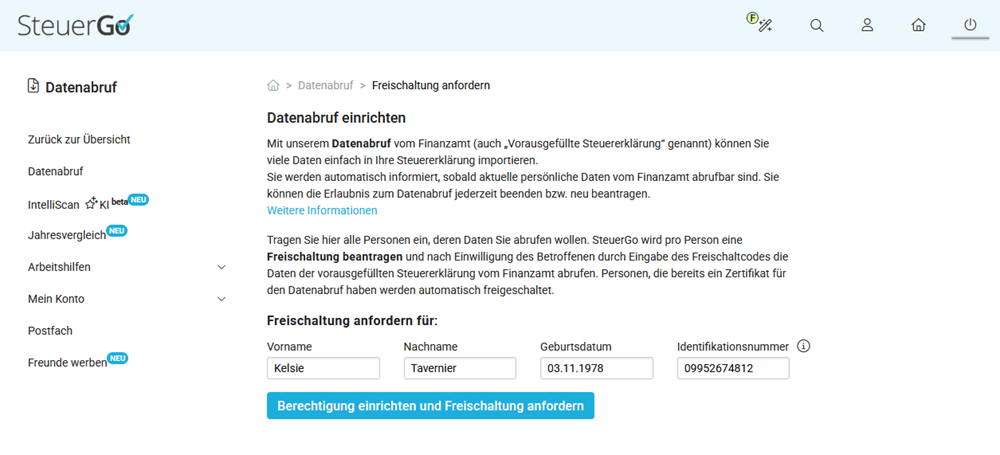
1. Set up permission for automatic data retrieval
Enter your first name, last name, date of birth, and identification number to set up permission for electronic data retrieval with SteuerGo and apply for activation with the tax authorities.
Important: You can only apply for and set up data retrieval for one person with SteuerGo. If you have multiple customer accounts, data retrieval can only be set up and managed in one account.
2. Activation for data retrieval
Once the activation has been successfully applied for, a confirmation page will be displayed. What happens next depends on whether you are already registered with ELSTER or not.
A. You are not registered with ELSTER:
If you are not registered with ELSTER, the activation is very simple and is done via the letter replacement procedure. You will automatically receive a 12-digit activation code by post ("activation code for electronic document retrieval") from your tax office within a few days.
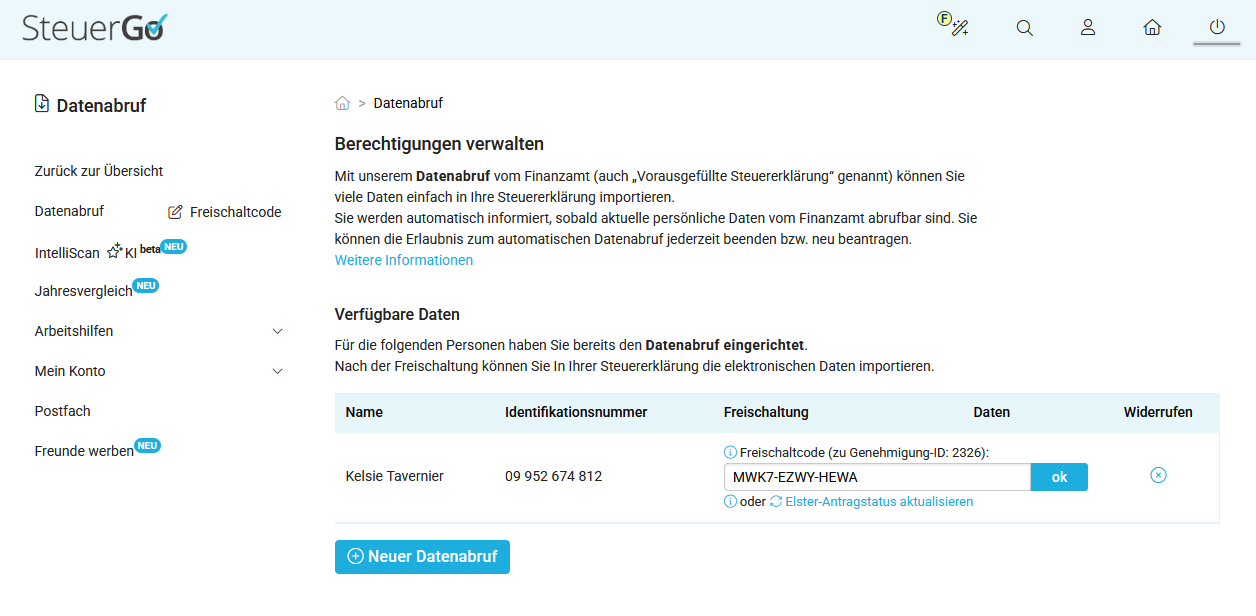
After receiving the activation code, simply access the "Data retrieval: Manage permissions" page at SteuerGo. Carefully enter the activation code in the designated field and confirm the entry with "OK".
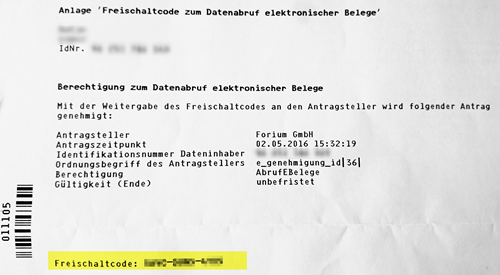
The tax authorities usually provide your data within the next 48 hours. As soon as the data is available, we will inform you by email. You can then import all data into your tax case via the "My tax return" page. If your tax office provides new data for you, we will automatically notify you in the future.
Important: If the activation code is not entered, the application will expire after a period of 90 days.
The activation code can be entered incorrectly a maximum of 4 times in a row. On the fifth incorrect attempt, the activation code will be deactivated. This means that both the activation code and the corresponding permission application are void. In this case, you must submit a new application.
B. You are already registered with ELSTER:
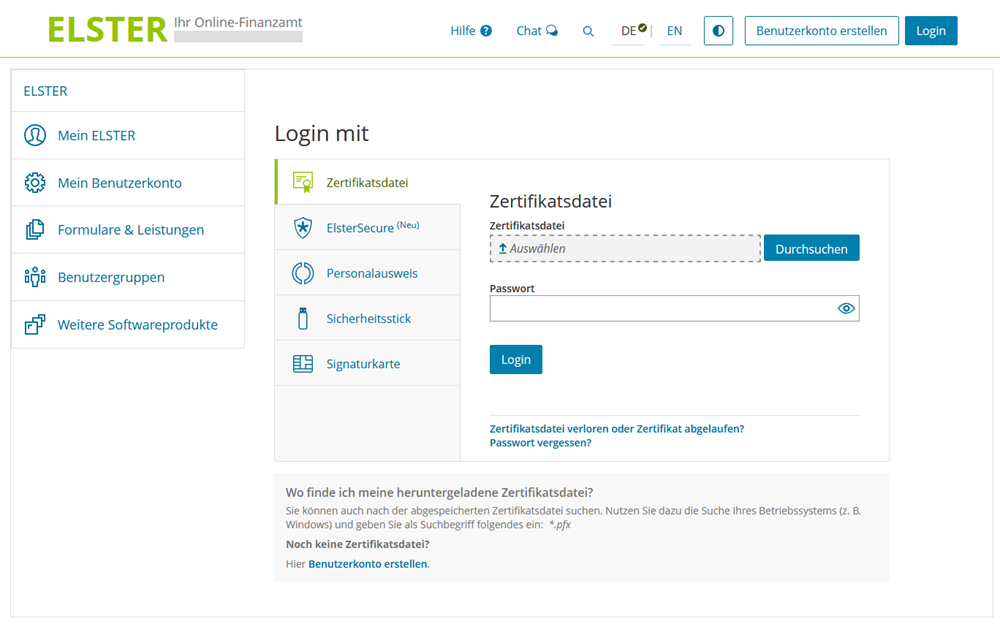
If you already have an active ELSTER account, the data retrieval activation is done directly online in your ELSTER user account. In this case, you will not automatically receive an activation code by post.
Proceed as follows:
- Log in to the "Mein ELSTER" portal at www.elster.de.
- Navigate to:
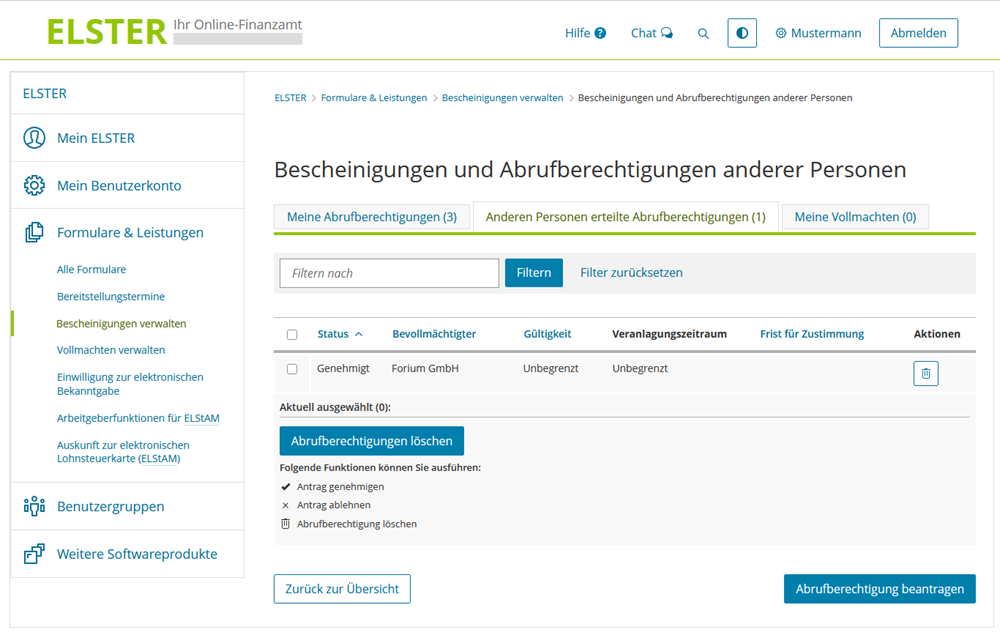
Forms & Services → Manage certificates → Certificates of other persons
- Select the area for "Data retrieval permissions granted to other persons".
- Grant permission for the following authorised representative:
"forium GmbH" (operator of SteuerGo)
This authorises SteuerGo to retrieve the electronic data stored at the tax office on your behalf.
After activation, it may take up to 48 hours for the data to be retrieved by SteuerGo for the first time. You will then be automatically informed by email.
Note: If your ELSTER access is no longer active (e.g. because the certificate has expired), you must register again. As part of the registration process, you will receive part of the activation data by post for security reasons.
Set up the automatic data retrieval step by step!
How do you activate data retrieval if you are already registered with ELSTER?
If you already have an active ELSTER account, the data retrieval authorisation is activated directly online in your ELSTER user account. You will not automatically receive an activation code by post in this case.
Please proceed as follows:
- Log in to the "Mein ELSTER" portal at www.elster.de.
- Navigate to:
Forms & Services → Manage certificates → Certificates of other persons
- Select the section for "Data retrieval authorisations granted to other persons".
- Grant authorisation for the following authorised representative:
"forium GmbH" (operator of SteuerGo)
This authorises SteuerGo to retrieve the electronic data stored at the tax office on your behalf.
After activation, it may take up to 48 hours for the data to be retrieved by SteuerGo for the first time. You will then be automatically informed by email.
Note: If your ELSTER access is no longer active (e.g. because the certificate has expired), you must register again. For security reasons, you will receive part of the activation data by post during the registration process.
How do you activate data retrieval if you are already registered with ELSTER?
Where can I view my electronically retrieved data?
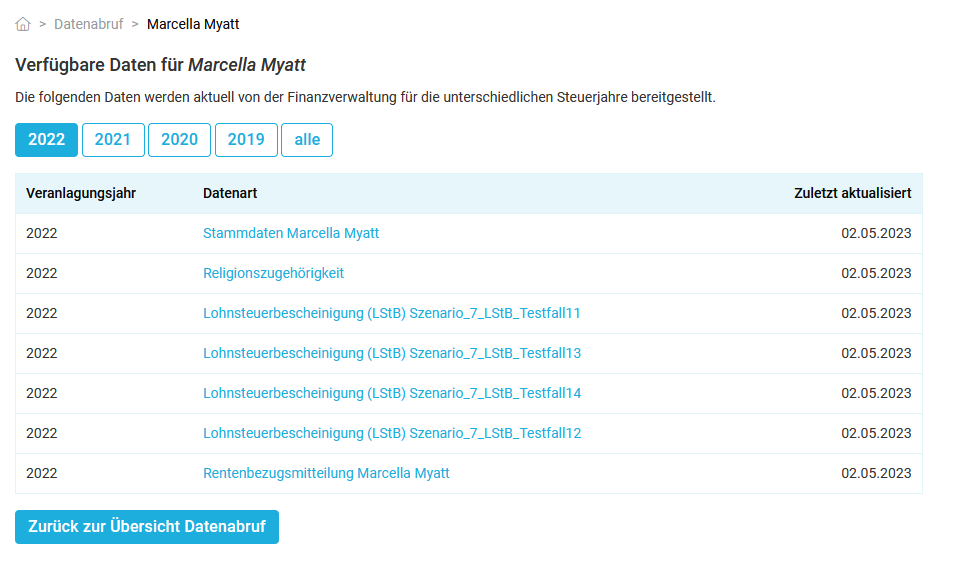
With SteuerGo, you can retrieve data electronically and view it online or download it as a PDF file. After logging in to SteuerGo, go to "Data retrieval".
In the overview, you can see for whom permissions for data retrieval have already been entered. Clicking in the "Data" column opens a list of the provided data.
Where can I view my electronically retrieved data?
How does manual data retrieval work?
For manual data retrieval, you need an ELSTER signature certificate, the associated password, and a retrieval code.
Once you have the certificate, password, and retrieval code, you can start the data retrieval and directly import the electronic data into your tax return. The data is retrieved from the tax authorities and then made available in your tax return.
Important: It will no longer be possible to set up new manual data retrieval via SteuerGo from 2025. However, if you have already set up manual data retrieval earlier, you can continue to update and retrieve your data manually.
How does manual data retrieval work?
How does the automatic data retrieval for third parties work?
You can also use SteuerGo to set up electronic data retrieval as part of the pre-filled tax return for other individuals, such as your spouse, partner, or children. However, due to the confidentiality of tax data, the other person must explicitly authorise you to do so.
In your customer account, go to "Settings", select "Data retrieval" and click on "Set up automatic data retrieval for another person".
Enter the first name, last name, date of birth, and tax identification number of the person whose data you wish to retrieve electronically via SteuerGo in the future.
The person (spouse, partner, child) will shortly receive a letter with an activation code by post from the tax office. Once the person has passed the activation code on to you, enter it in your customer account at SteuerGo – you can now also retrieve data for this person.
Note: The authorisation for data retrieval can be revoked at any time in our customer account and data already retrieved can be deleted.
How does the automatic data retrieval for third parties work?