How can I change data that has already been submitted?
If you discover an error after filing electronically or wish to add information, you can correct your tax return using SteuerGo. The steps you need to take depend on whether a tax assessment notice has already been issued.
What applies before the tax assessment notice?
Amend your details in SteuerGo and resubmit the complete, corrected tax return electronically to the tax office.
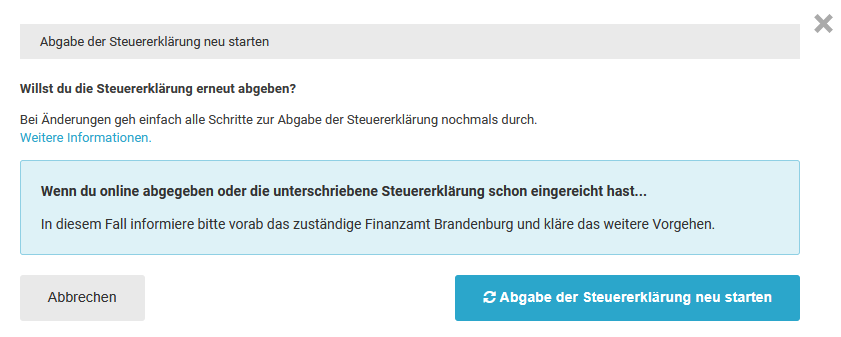
In addition, briefly inform the tax office that the new submission corrects the previous return and specify which details you have changed.
When you resubmit, you are filing a new version, which will generally be used for further processing.
Wichtig
What applies if you receive a reminder despite having filed successfully?
An acknowledgement of receipt with a transfer ticket documents successful receipt on the tax administration’s ELSTER servers. A reminder therefore does not automatically mean that your return was not transmitted.
Provide your tax office with the acknowledgement of receipt and expressly ask them to check receipt and whereabouts using the transfer ticket. Please observe any deadlines set.
Do not resubmit your return solely because of a reminder. As a rule, you should only file again if changes are required or after expressly agreeing this with the tax office.
What applies after the tax assessment notice?
If you have already received a tax assessment notice, you should generally lodge an appeal within one month of notification if you wish to request changes. State the changes you would like to make. Resubmission alone does not replace an appeal lodged within the deadline.
How can I change data that has already been submitted?
Will I receive confirmation of receipt for the submission of my tax return?
After your tax return has been successfully submitted electronically, the confirmation of receipt will be available to you as a PDF file in your personal area on SteuerGo.
The first page contains the dispatch and receipt confirmation generated by SteuerGo, including the dispatch date and transfer ticket. This confirms that your tax return has been successfully received on the tax administration’s ELSTER servers and serves as proof of submission.
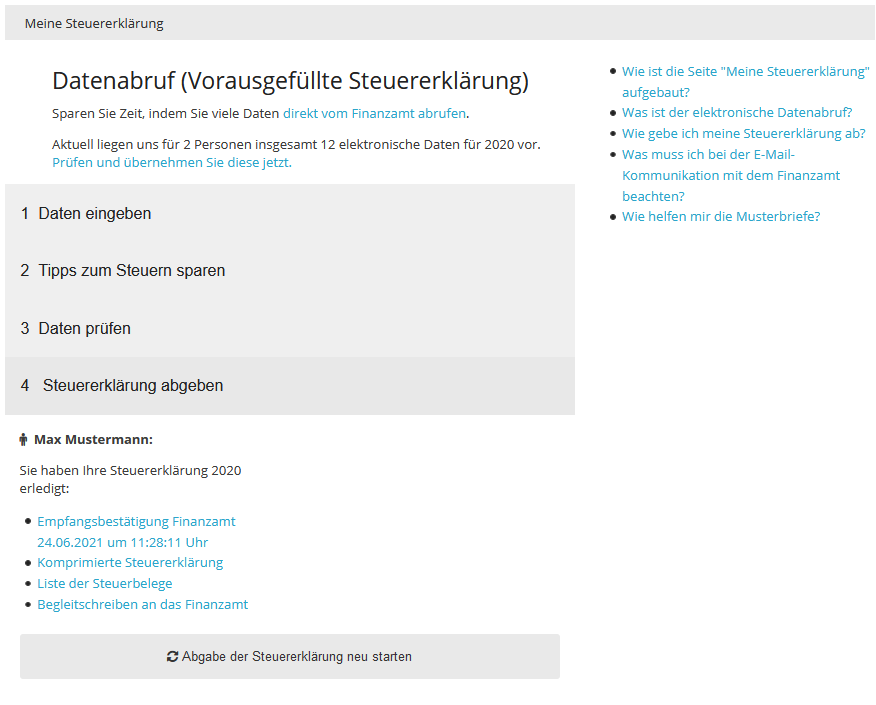
The following pages contain the data from your tax return transmitted to the tax office. Download the full confirmation of receipt and keep it for your records.
If you submit online with identification or using your own ELSTER certificate, you do not need to additionally print out your tax return, sign it and send it to the tax office by post.
Wichtig
A reminder for non-submission does not automatically mean that your tax return was not transmitted. Present your confirmation of receipt with transfer ticket to your tax office and expressly ask them to check the receipt and whereabouts of your return. Please observe the deadlines stated in the reminder.
Do not resubmit the return solely because of a reminder. As a rule, a resubmission should only be made if there are changes or after expressly agreeing this with the tax office.
Will I receive confirmation of receipt for the submission of my tax return?
The tax office cannot find my tax return. What can I do?
If you have received an acknowledgement of receipt with transfer ticket, your tax return has been successfully transmitted to the tax authority’s ELSTER servers. Please keep this confirmation as proof.
It may happen that your return cannot initially be found by the responsible tax office. It may not yet have been assigned to a tax number, or it may have been assigned to a different one.
How can you have receipt checked?
- Present the acknowledgement of receipt: Download the complete PDF file from your personal area under “Submit tax return” and present it to your tax office.
- Request an investigation: Please expressly ask for the receipt and whereabouts of your tax return to be checked using the transfer ticket and the dispatch date. Returns that have not yet been assigned, or have been assigned incorrectly, should also be taken into account.
- Involve the ELSTER contact person: If your return still cannot be found, ask your case officer to involve the responsible ELSTER contact person at the tax office. They can arrange for a more detailed investigation.
What applies if you receive a reminder for non-submission?
Respond promptly and observe the deadlines set out in the reminder. Present the acknowledgement of receipt and ask for receipt to be checked and for the reminder to be withdrawn if the submission already made is confirmed.
Wichtig
Do not resubmit your tax return solely because of a reminder. As a rule, a resubmission should only be made if there are changes or after explicit consultation with the tax office.
The tax office cannot find my tax return. What can I do?
What data is stored by SteuerGo?
After successful electronic submission, SteuerGo saves the confirmation of receipt as a PDF file for you:
- The first page contains the dispatch and receipt confirmation generated by SteuerGo, including the dispatch date and transfer ticket. It documents the successful receipt of your tax return on the ELSTER servers of the tax authorities.
- The following pages contain the data from your tax return transmitted to the tax office.
You will find the confirmation of receipt in your personal area under “Submit tax return”. Download the complete file and keep it as proof of submission.
If your tax office cannot find your return, present the confirmation of receipt and expressly ask them to check receipt and whereabouts using the transfer ticket.
What data is stored by SteuerGo?
How long may it take the tax office to process the tax return?
Unfortunately, there is no deadline by which the tax office must process your tax return! Based on experience, as a rule, it can take between 2 and 3 months to process your tax return.
In case of doubt, it may be advisable to call the person responsible for processing your tax return.
Important: The tax office cannot take as long as it wants to process your tax return. If more than six months have passed since you submitted your tax return without the tax office taking action, you have an option to file a so-called objection of failure to act. You can file this objection with your tax office (sect. 347 para. 1 sentence 2 of the Fiscal Code (AO)).
How long may it take the tax office to process the tax return?
Would you like to resubmit your income tax return?
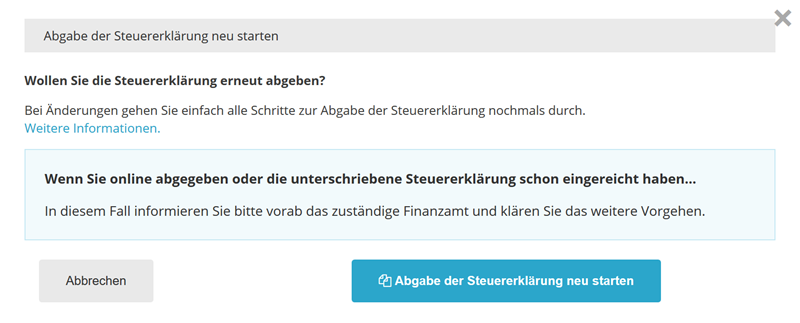
If you wish to amend your tax return, the next steps depend on whether you have already submitted the return and whether a tax assessment notice has been issued.
What applies before the first submission?
As long as you have not yet submitted your tax return to the tax office, you can amend your details in SteuerGo. Then check your entries and submit the return electronically.
What applies after submission?
If no tax assessment notice has yet been issued, amend your details in SteuerGo and resubmit the complete, corrected tax return electronically.
In addition, briefly inform the tax office that the new submission corrects the previous return and specify which details you have amended.
You will be submitting a new version, which will generally be used for further processing.
Important
What applies if you receive a reminder despite successful submission?
An acknowledgement of receipt with a transfer ticket documents the successful receipt of your tax return on the tax administration’s ELSTER servers. A reminder does not automatically mean that your return was not submitted.
Provide your tax office with the acknowledgement of receipt and expressly ask them to check receipt and whereabouts using the transfer ticket. Please observe any deadlines set.
Do not resubmit your return solely because of a reminder. As a rule, you should only resubmit if you have made changes or after expressly agreeing this with the tax office.
What applies after the tax assessment notice?
If you have already received a tax assessment notice, you should generally lodge an objection within one month of notification if you wish to request changes. State the changes you would like to be made. Resubmission alone is not a substitute for lodging an objection within the deadline.
You can find a template under “Objection due to error”.
Who can help with technical questions?
If you have any questions about using SteuerGo, our customer service team will be happy to help at hilfe@steuergo.de.
Would you like to resubmit your income tax return?